Introduction
When it comes to typing comfort and tactile satisfaction, few details matter more than how a keyboard feels under your fingers. Among the many features users seek—backlighting, layout, responsiveness—one rising trend stands out: the quest for the creamiest keyboard. This term describes a typing experience that’s smooth, consistent, and buttery in its execution. Each keystroke glides effortlessly from press to release, with no clatter or resistance.
Moreover, the demand for the creamiest keyboard is growing among typists, coders, writers, and mechanical keyboard enthusiasts. It’s not just about speed—it’s about sensation. A truly creamy switch delivers linear motion, minimal noise, and an almost fluid key travel. This guide dives deep into what makes a keyboard feel “creamy,” which switches deliver it, and how to build or choose your ideal typing companion.
 What Makes a Keyboard Feel Creamy?
A keyboard earns the title of creamiest keyboard through several key traits. First, switch type plays the biggest role. Linear switches like Gateron Milky Yellows, Kailh BOX Jades, or Cherry MX Reds offer smooth travel without tactile bumps. These avoid interruptions during keystrokes.
Second, lubrication (or “lube”) improves consistency. Factory-lubed switches are rare. Most creamy keyboards use pre-modded or hand-lubed switches. Lubricant reduces friction between moving parts. This results in smoother actuation and quieter operation.
Third, housing material matters. Polycarbonate top cases dampen sound. They create a softer acoustic profile. Aluminum cases add weight and stability. Both contribute to a premium feel.
Fourth, plate design affects key alignment. Gasket-mounted plates absorb micro-movements. They allow slight flex during typing. This enhances comfort over long sessions.
Fifth, stabilizers require tuning. Space bars and larger keys often rattle. Properly lubed and clipped stabilizers eliminate this noise. They move as one with the rest of the board.
Finally, keycaps influence texture. PBT plastic resists shine. It maintains grip over time. Thick profiles feel solid. Rounded tops fit fingertips naturally.
Key Switches That Deliver the Creamiest Experience
Gateron Milky Yellow switches are often called the standard for creamy performance. They’re linear, factory-lubed, and affordable. Their smooth travel appeals to beginners and experts alike.
Kailh BOX Jade switches offer a close alternative. They have a slightly heavier feel. The box design keeps dust out. This extends lifespan and preserves smoothness.
Cherry MX Reds remain popular. However, they need manual lubrication. After lubing, their performance rivals higher-end options. Many DIY builders start here.
Durock T1s are premium picks. They feature wide stems and tight tolerances. When lubed, they deliver near-silent, ultra-smooth action. Ideal for quiet offices.
NovelKeys Cream switches are named for a reason. They use a unique stem shape. Combined with light lube, they glide like silk. Favored by custom keyboard lovers.
JWK Linear V4 switches are budget-friendly. Despite low cost, they offer excellent smoothness. Often used in entry-level custom builds.
For silent typing, Zilents or Holy Pandas exist. These combine tactile bump with noise reduction. Not fully linear, but still very smooth when modded.
Each switch has its own flavor. Try different types to find your personal creamiest keyboard match.
 How Lubrication Transforms Keyboard Performance
Lubrication is the secret behind most high-end creamy keyboards. Without it, even good switches can feel scratchy. Tiny metal-on-plastic contacts create friction. Over time, this degrades the typing rhythm.
Applying lubricant changes everything. Switch films reduce stutters. Stem rails get coated. This eliminates internal grinding. The result? A silky keystroke that feels consistent across all keys.
Common lubes include Krytox 205g0 and Tribosys 3203. These are lightweight. They don’t attract dust. Thicker greases suit heavy-duty use. They last longer but may slow return speed.
Switch springs also benefit. Top halves get lighter lube. This reduces ping—a metallic echo after release. Bottom halves stay dry or lightly greased.
Some builders use band-aid modding. Tape inside the case absorbs vibrations. This softens sound further. It complements lube work perfectly.
Lubing takes time. Each switch must be disassembled. Pins, housings, and sliders get treated. Reassembly requires patience. But the payoff is worth it.
Pre-built boards now offer factory-lubed options. Brands like Keychron and Drop include lubed switches. This saves effort for non-modders.
Even stock keyboards improve with lube. Older models regain their smoothness. It’s a simple upgrade with big impact.
Building Your Own Creamiest Keyboard
Creating a custom creamy keyboard gives full control. Start by choosing a kit. Options range from 70to200. Popular choices include the Epomaker TH80, Glorious GMMK, or Drop ALT.
Next, pick a switch type. Decide between hot-swap or soldered. Hot-swap lets you change switches later. Soldered offers better electrical contact. Most creamy builds use hot-swap.
Choose stabilizers. Plate-mounted stabs are common. PCB-mounted ones reduce wobble. Dampen them with foam or tape. Lube each stem for silence.
Install a case gasket. Silicone or poron pads go under the plate. They cushion each keystroke. This adds bounce and softness.
Add sound-dampening materials. Foam inside the case kills echo. Cotton or pet hair works too. Avoid blocking USB ports.
Select keycaps. Double-shot PBT lasts longest. Legends won’t fade. Textured surfaces prevent slipping. Match color to your aesthetic.
Flash firmware if needed. QMK or VIA allows remapping. Customize every key. Save multiple layers for efficiency.
Test every key. Type long sentences. Listen for rattles. Fix any unstable switches. Enjoy the final product.
Why Sound Matters in a Creamy Typing Experience
A true creamiest keyboard isn’t just about feel—it’s about sound. Acoustic feedback influences perception. A thocky, deep tone feels more satisfying than a sharp click.
Case foam plays a major role. It fills empty space. This prevents hollow echoes. Silicone or felt lining absorbs vibrations.
Plate thickness affects tone. Thicker plates produce deeper sounds. Thin ones may buzz. Aluminum plates ring slightly. Steel adds weight and warmth.
PCB material contributes too. FR4 boards are standard. Flexible PCBs bend slightly. This creates a softer landing.
O-ring mods soften keypresses. Small rubber rings sit under keycaps. They limit bottom-out force. Less noise occurs on impact.
Tune stabilizers carefully. Use costar clips or spring-in designs. Lube the stems and housing. Test for rattle-free movement.
Typing style changes acoustics. Fast typists hear more clatter. Light touch typists favor soft landings. Adjust build based on preference.
Sound profiles vary. “Thock” is deep and muted. “Clack” is sharp and bright. “Cream” sits in the middle—smooth and balanced.
Many record typing videos. ASMR content thrives on subtle audio. A well-tuned board becomes part of the sensory experience.
 Who Should Consider the Creamiest Keyboard?
Writers and authors benefit greatly. Long hours at the keyboard demand comfort. A creamy feel reduces finger fatigue. Words flow faster when typing feels effortless.
Programmers spend hours coding. Repetitive keystrokes strain joints. Smooth switches reduce resistance. This lowers risk of strain injuries.
Gamers who prefer stealth enjoy quiet boards. No loud clicks give away position. Linear creams allow fast, silent inputs. Tactical advantage meets comfort.
Office workers face distractions. Loud keyboards annoy coworkers. A creamy keyboard operates quietly. Productivity stays high without noise complaints.
Students writing papers appreciate tactile ease. Late-night typing feels less harsh. Focus remains strong during long sessions.
Content creators value aesthetics and sound. Typing ASMR videos need clean audio. A creamy board delivers crisp, pleasant tones.
Beginners learn better with smooth feedback. Harsh switches frustrate new users. A gentle typing experience encourages practice.
Even casual users notice the difference. Email, browsing, and messaging become more enjoyable. Comfort adds up over time.
How to Maintain a Creamiest Keyboard
Maintenance ensures lasting performance. Dust and debris enter over time. Remove keycaps monthly. Blow out crumbs with compressed air.
Check for stickiness. If keys feel rough, re-lube them. Disassemble and clean. Wipe stems and housings before reapplying grease.
Inspect stabilizers regularly. Rattles develop after months. Re-lube or clip them again. Prevent degradation early.
Replace worn keycaps. Shine or smudge affects grip. PBT holds up best. ABS polishes quickly.
Use a keyboard cover when not in use. Protects from spills and particles. Great for shared spaces.
Keep drinks away. Liquid damage ruins switches. Spills cause shorts. Immediate drying helps—but prevention is better.
Store in a dry place. Humidity warps wood cases. Moisture corrodes contacts. Avoid basements or humid rooms.
Update firmware occasionally. Fixes bugs. Adds features. Check manufacturer site for updates.
Treat your keyboard like a tool and a treasure. With care, the creamiest keyboard stays perfect for years.
 Frequently Asked Questions
What does “creamiest keyboard” mean? It refers to a smooth, buttery typing feel. Keystrokes are consistent and fluid.
Are creamy keyboards loud? No. They’re usually quiet. Lubed linear switches minimize noise.
Can I make my laptop keyboard creamy? Not directly. But external creamy keyboards help.
Do I need to lube my switches? For maximum creaminess, yes. Pre-lubed options exist.
Are these keyboards expensive? Custom builds can cost 150–300. Budget options start lower.
Is PBT better than ABS keycaps? Yes. PBT resists shine and wear.
Can I fix a scratchy switch? Yes. Take it apart and re-lube. Clean all parts first.
Do wireless keyboards feel creamy? Some do. Keychron Q series includes lubed switches.
How often should I clean my keyboard? Every 1–3 months. More if you eat nearby.
Can I type faster on a creamy keyboard? Not necessarily. But accuracy and comfort improve.
Do gamers need creamy keyboards? Only if they prefer smooth, quiet input.
Is building a custom keyboard hard? Requires patience. Follow video guides. Start simple.
 Final Thoughts
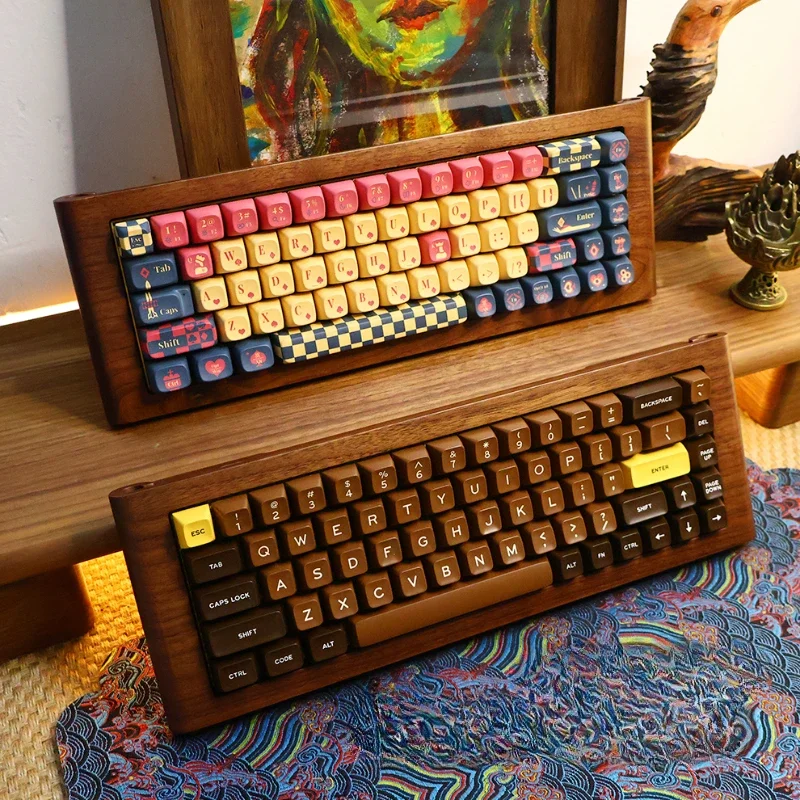
Finding the creamiest keyboard is about matching feel, sound, and function. Whether you build it yourself or buy a pre-modded version, the goal remains the same: smooth, satisfying, and comfortable typing.
From switch choice to lube technique, every detail shapes the experience. Invest in quality parts. Learn maintenance. Personalize your setup. The creamiest keyboard isn’t just a tool—it’s a joy to use every single day. Choose wisely, type smoothly, and enjoy the glide.